
111 lines
6.5 KiB
Markdown
111 lines
6.5 KiB
Markdown
# ESP32-C3 Development Board
|
|
|
|

|
|

|
|
<a href="https://www.tindie.com/stores/sonocotta/?ref=offsite_badges&utm_source=sellers_andrey-malyshenko&utm_medium=badges&utm_campaign=badge_medium"><img src="https://d2ss6ovg47m0r5.cloudfront.net/badges/tindie-mediums.png" alt="I sell on Tindie" width="150" height="78"></a>
|
|
<br />
|
|
[](https://discord.gg/PtnaAaQMpS)
|
|
|
|
The ESP32 C3 Nano is an Arduino Nano compatible development board, designed to provide enhanced computing power, wireless connectivity, addressable LED capabilities, and a built-in programming and debugging interface.
|
|
|
|
It is based on the ESP32 C3 chip, which provides improved processing capabilities, increased memory, and wireless connectivity compared to traditional Atmega variant.
|
|
|
|
The board maintains compatibility with the Arduino Nano form factor, ensuring easy integration into existing projects and making it a drop-in replacement for the traditional Arduino Nano board.
|
|
|
|

|
|
|
|
## Features
|
|
|
|
- [ESP32-C3](https://www.espressif.com/en/products/socs/esp32-c3) 32-bit RISC-V MCU in a 32-pin package
|
|
- Up to 160 MHz CPU clock
|
|
- 4 MB Flash
|
|
- 400 KB SRAM
|
|
- WiFi and BLE
|
|
- Native USB for flashing and debugging
|
|
- Onboard 3V3 LDO (disconnected for low power applications)
|
|
- Flash using Arduino IDE, Platformio, or the IDE of your choice
|
|
- One RGB LED (WS2812B)
|
|
- RESET button
|
|
|
|
## ESP32-C3
|
|
|
|
ESP32-C3 is an entry-level 32-bit MCU in the ESP32 line. Generally they offer similar feature set compared to other ESP32 chips, but designed to be low-cost from the start, including popular communication interfaces, low power consumption in sleep mode (down to few micro-amps) and ease of use.
|
|
|
|
| | ESP8266 | ESP32 | ESP32-C3 | ESP32-S2 | ESP32-S3 |
|
|
|---------------|----------|------------|------------|------------|------------|
|
|
| Cores | 1x L106 | 2x LX6 | 1x RISC-V | 1x LX7 | 2x LX7
|
|
| Max Frequency | 160 Mhz | 240 Mhz | 160 Mhz | 240 Mhz | 240 Mhz
|
|
| Flash | External 1 MB (Typical)| External Up to 16 MB | Internal 4 MB or External | Internal 4 MB or External | Internal 8 MB or External
|
|
| SRAM Total | 160 KB | 320 KB | 400 KB | 320 KB | 520 KB
|
|
| SRAM Usable | 80 KB | 160 KB | 160 KB | 180 KB | 225 KB
|
|
| PSRAM | NA | External 4 MB | NA | Internal 2 MB or Ext | Internal 2 MB or 8 MB or Ext
|
|
| GPIO count | 11 Usable| 34 Total | 22 Total | 43 Total | 45 Total
|
|
| Connectivity | WiFi | WiFi + BT | WiFi + BLE | WiFi | WiFi + BLE
|
|
| USB | No | No | Yes + JTAG | Yes | Yes + JTAG
|
|
| UART | 1+ | 3 | 2 | 2 | 3
|
|
| I2C | 1 | 2 | 1 | 2 | 2
|
|
| SPI | 1 | 4 | 3 | 4 | 4
|
|
| I2S | 1 | 2 | 1 | 1 | 2
|
|
| LCD | No | No | No | No | Yes
|
|
|
|
## Board Pinout
|
|
|
|

|
|
|
|
## MCU Pinout
|
|
|
|

|
|
|
|
## How to programm
|
|
|
|
To program the ESP32-C3 microcontroller, you may use either Serial upload method or USB Upload. ESP32-C3 Development Board uses USB Upload method.
|
|
|
|
You need to connect USB-C cable, it will be used to power the board, flash over USB, serial over USB and JTAG over USB
|
|
|
|
### Arduino IDE
|
|
|
|
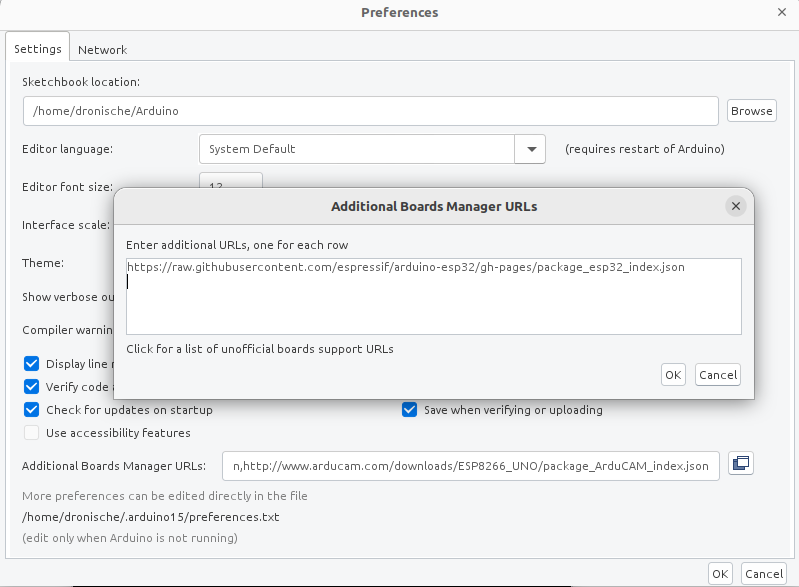
Add [https://raw.githubusercontent.com/espressif/arduino-esp32/gh-pages/package_esp32_index.json](https://raw.githubusercontent.com/espressif/arduino-esp32/gh-pages/package_esp32_index.json) to the board manager
|
|
|
|
|
|
|
|
After that you should install **ESP32 by Espressif Systems** from Board Manager
|
|
|
|

|
|
|
|
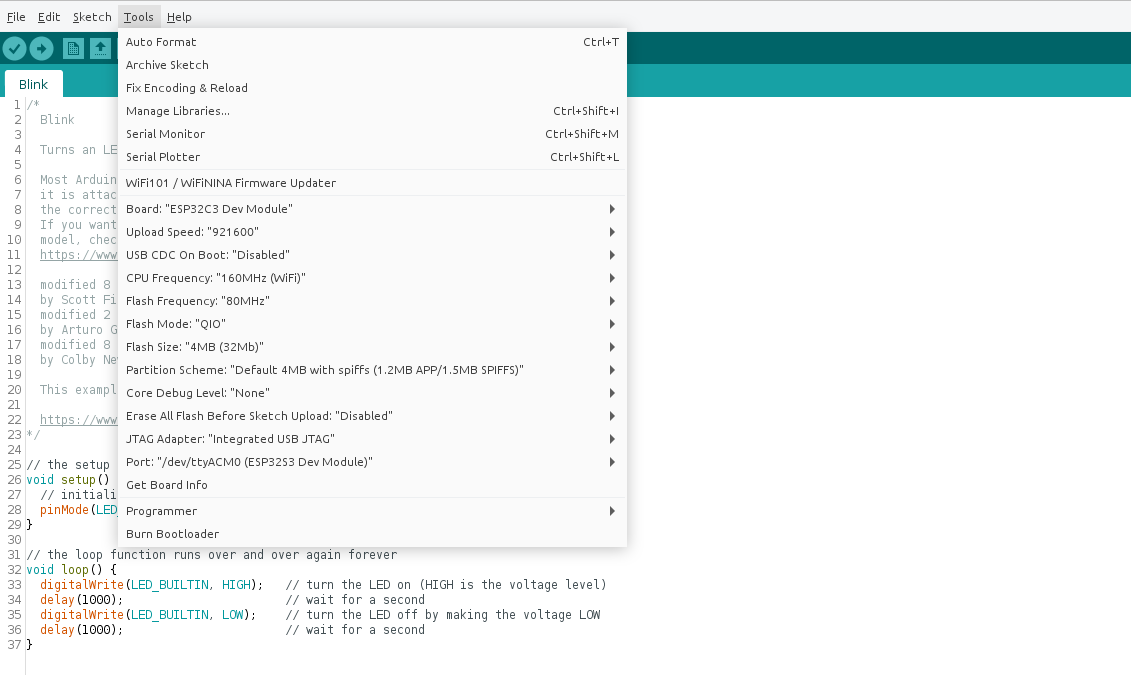
Select **ESP32 C3 Dev Board** as target and other necessary settings in the board settings after
|
|
|
|
|
|
|
|
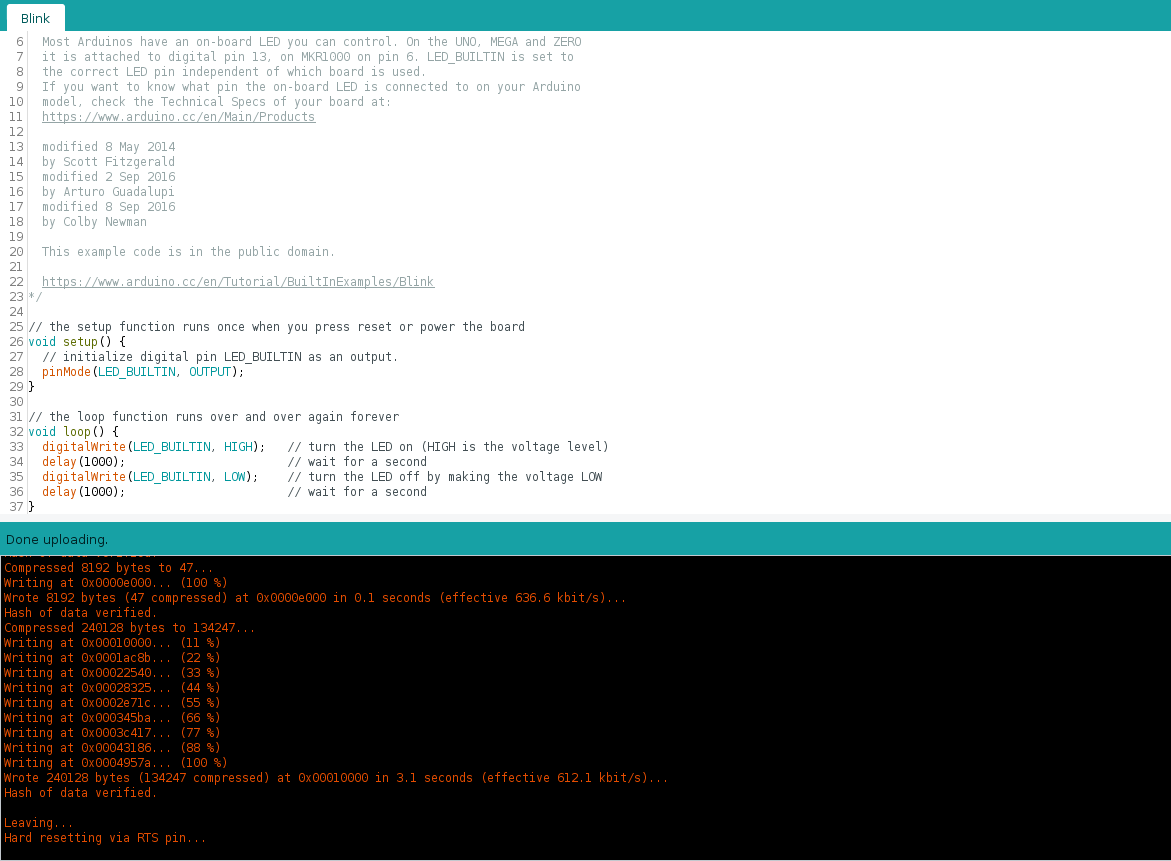
Next press Build or Upload button, it should just work (RGB LED will blik white with blinky example)
|
|
|
|
|
|
|
|
### Platformio IDE
|
|
|
|
After installing [Plarformio IDE](https://platformio.org/platformio-ide), open sample [arduino project](/firmware/esp32c3-blink). Run `Build` command to install necessary tools and libraries.
|
|
|
|
Next run `Upload: esp32-dev-board` task to start upload over USB. `Monitor` task should give you Serial monitor, as long as you have your board connected via USB (Serial port appears right after board boots up).
|
|
|
|
## Hardware
|
|
|
|
Board schematic can be found in the [hardware](/hardware) section
|
|
|
|
| Front | Back |
|
|
|---|---|
|
|
|  | 
|
|
|
|
|
|
-  ESP32-C3 MCU
|
|
-  WS2812B RGB LED
|
|
-  Programming and Debug port (USB-C)
|
|
-  Hardware Reset button
|
|
-  VIN disconnect - cut this line to disconnect LDO chip and power-on LED, recommended for low-power applications
|
|
|
|
## Where to buy
|
|
|
|
Available at [Tindie](https://www.tindie.com/products/sonocotta/esp32-c3-development-board)
|
|
|
|
## Links
|
|
|
|
- [ESP32-C3 Product Page](https://www.espressif.com/en/products/socs/esp32-c3)
|