Configure Digitrax SE8c
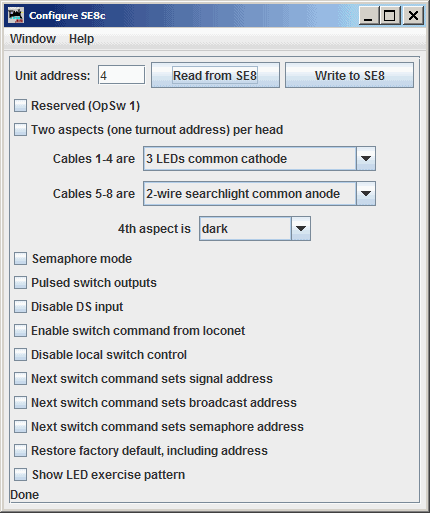
The JMRI SE8c programming tool lets you configure the internal options of a Digitrax SE8c Signaling Decoder Board directly from your computer.
To open this tool from the JMRI pane select the LocoNet menu and then find the tool on the list.
To use it, you put the address of an SE8c board in the text field and click "Read from SE8c". The tool will read back the current state of the various options, and set the check boxes to correspond to their current values.
You can then, if you wish, change the checkboxes and click "Write to SE8c" to make your changes permanent.
The tool relies upon each SE8C board to have a unique "Board ID" (Board Address) in order to configure each device individually. While it is possible to change the Board ID number using JMRI, it cannot be done using this tool due to limitations of the SE8C design. Instead, follow the instructions found here, but you must consult the SE8C manual and modify the JMRI-based process to suit the SE8C device's buttons, button press time, and lamp flashes.
Limitations
- Because of the way the SE8c board works, this tool can't change the basic address of the unit. It is possible to change the Board ID number using JMRI by following the instructions found here. Note that it is necessary to consult the SE8C manual and modify the JMRI-based process shown at the link above to suit the SE8C's buttons, button press time, and lamp flashes.
- The SE8c can be configured to send Sensor status on the LocoNet in response to a "track power on" command. The SE8c does not send Turnout status in response to a "track power on" command.
- This tool is able to access SE8c boards with addresses between 1 and 36. Users are advised to avoid using the factory default board address (board address 1) as it will be difficult to program new boards with unique data if any in-service board is using the factory default board address.
See Also
Documentation for the SE8c can be found at the Digitrax Web Site.