Where Used
The Where Used tool is usd to search JMRI for references to a selected item.
When the tool is started, it displays a dropdown combo box that is used to select the item type. When the type has been selected, the second dropdown combo box will contain a list of items for the selected type. After selecting an item, click on the Create button. The references to the selected item will be displayed in lower part of the window.
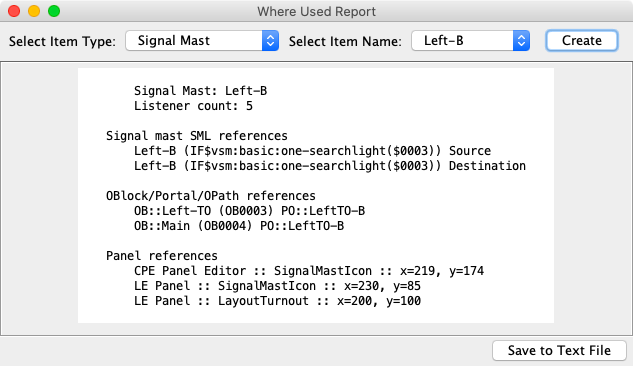
The Save to Text File button can be used to save the reference report to a text file.
Reference Lines
Depending on the search results, the matchs are listed under a header that indicates where the match occurred. The detail lines provide information about the matches. The formats are shown below.
- user name (system name)
-
This is the object that references the selected item.
Route references Sensors (IO:AUTO:0002) - user name (system name) data
-
Additional data is included after the name.
Signal mast SML references Left-B (IF$vsm:basic:one-searchlight($0003)) Source Left-B (IF$vsm:basic:one-searchlight($0003)) Destination - panel name :: icon type :: location
-
The location portion provides the xy coordinates.
    Panel references
        CPE Panel Editor :: SignalMastIcon :: x=219, y=174
        LE Panel :: SignalMastIcon :: x=230, y=85
        LE Panel :: LayoutTurnout :: x=200, y=100
This example may seem confusing. The selected item was a signal mast. It is on the Layout Editor panel AND it is attached to a block boundary on the turnout at the indicated location. - source name -> destination name
-
Used to identify a pair such as signal mast logic or entry exit sensors.
Signal mast SML references Right-B -> Right-EB Right-C -> Right-EB Right-A -> Left-B Right-A -> Left-C - transit name, action for "section name" section
-
Identify the transit and section that refers to the selected action item.
Transit references Left to Right (IZ:AUTO:0001), action for "LeftTO to Main" section - logix name, conditional name, type: description
-
The Logix/Conditional format includes Logix and Conditional names, either antecedent or
action for the type and the full description.
Logix Conditional references System Logix (IX:SYS), Sensor Group Test, antecedent: Sensor "S-Group-Center" state is "Sensor Active" System Logix (IX:SYS), Sensor Group Test, action: On Change To True, Set Sensor, "S-Group-Center" to Inactive - O.S. name : sub-type object-type
-
The O.S. name is the turnout number and the signal number. The sub-type is either Global
or a detail section acronym.
    CTC references
        1/2 : SWDI Turnout
        1/2 : TUL Turnout