JMRI Code: Continuous Integration
"Continuous Integration" is the process of rebuilding a system every time it changes, so that you rapidly learn of new problems and are motivated to remove existing ones.
The core of our system is a series of GitHub Actions and Jenkins jobs that routinely build the code, run checks, and creates downloadable installers. That means that we can and do put changes into our users hands very quickly. There's a CI status page that shows the combined status of that.
We divide these into three groups:
- Mandatory checks that must be OK before the change will be merged.
- Optional checks that provide additional information on the code. These don't have to be completely cleared before a change is merged, but their observations should be considered and their metrics should be improving.
- Independent checks that are run by our Jenkins instance on a periodic basis to look for deeper problems.
These checks can be run locally by developers before uploading changes to Github, see Running JUnit Tests.
Mandatory Checks
We use multiple GitHub actions to test every proposed change entered into our GitHub code repository before it gets merged.
These checks are defined by files in the .github/ directory.
They normally run both on PRs to the main JMRI/JMRI repository,
but also on pushes and PRs to your own repository.
If you want to turn that off,

- On the page for your own repository, select "Settings"
- From the left sidebar, select "Actions"
- Pick on option for what can run. The bottom option turns everything off for you locally.
Note that if you turn this off, the "Actions" tab won't show in the GitHub web interface until you turn it back on.
Windows CI tests
This runs "AllTest", our test suite of over 30,000 JUnit tests on a Windows server. A screen buffer (not a real screen) is used for all the GUI tests. All tests must pass.
Headless tests
Reruns the JUnit test suite in "java.awt.Headless=true" mode to ensure that the parts of JMRI that are meant to run without a GUI really can. This is about 80% of the test suite. These are run on Linux. All tests must pass.
Separate tests
About a hundred JUnit graphical tests are run separately from AllTest to ensure they have a clean environment. These are run on Linux. All tests must pass.
Static analysis
This runs a series of static analysis checks:
- A pass of the ECJ compiler with warnings on
- Spotbugs
- CheckStyle
- A Javadoc generation and check
- A scan of the help files with htmllint
- And a set of architecture checks of interpackage references, etc.
Any errors or warnings fail this step.
Process steps
There are a few additional actions that are used as process controls:
- Checks consistency of TypeScript and Javascript files.
- Set flags that represent whether a PR might need localization, and whether it contains updated help files.
- If needed, reminds the author to add to the release note
- Prevent PRs marked "WIP" (Work In Progress) from being merged
- Require that PRs be approved by a 2nd party before being merged
- And enforce a 24-hour waiting period so that the world-wide team can get a look at the PR.
Optional Checks
We also run advisory checks on every pull request (PR). Although we don't require that they have zero warnings, we strongly recommend that people look at them and try to improve their metrics of test coverage, simplicity and understandability, etc.
Code Climate
The Code Climate points out places where the code appears to be complex in various ways. (It also provides coverage information, though JaCoCo seems to do a better job of that.) We recommend you look at those results and make updates where they make sense, so that things are continuously improving, but not every suggestion it makes is worth it, or even appropriate. We don't require this to be clean before merging.
Code Climate is controlled by the .codeclimate.yml file.
Independent Checks with Jenkins
JMRI uses the Jenkins continuous integration engine for integration and test builds. This includes keeping our website up to date as changes are committed, building installer packages from development builds, and building final releases.
Our primary Jenkins engine is at https://builds.jmri.org/jenkins/. Because it's hosted
outside the US, we force its Java locale to US English by setting the LC_ALL
environment variable to en_US in the master Jenkins configuration settings.
Specific Jenkins results of interest:
- Builds page, showing status of the builds done after every series of commits. Successful builds are followed by building installers via the Packages job. These are sometimes referred to as "development builds".
- JaCoCo page, showing test coverage from our JUnit tests. There's both a summary of overall coverage, and detailed information on each class and method.
-
SpotBugs
page, showing status of the more-extensive SpotBugs tests
done periodically. There are also pages of the most recent
changes and the most recent
results.
For more information on JMRI's use of SpotBugs, see the separate SpotBugs page.
Jenkins Integration with NetBeans
If you are developing in the NetBeans 7.0 environment, it is possible to integrate feedback from the Jenkins Continuous Integration (CI) engine.
Within the NetBeans environment, reference is made to the Hudson CI engine - Jenkins is a "fork" of the Hudson code and supports the same API.
Integration into NetBeans is achieved by executing the following steps:
- Open NetBeans
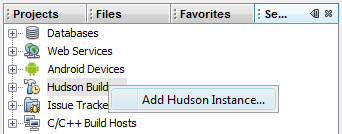
- Switch to the 'Services' window (shortcut key 'Ctrl+5')
- Right-click (Ctrl-click on Mac) the entry 'Hudson Builders' and choose 'Add Hudson
Instance...'
- In the resulting pop-up, complete the following:
- Name
- JMRI
- URL
- https://builds.jmri.org/jenkins/
- Auto refresh every X minutes
- 60 (change from the default of 5 to avoid overloading the CI server)

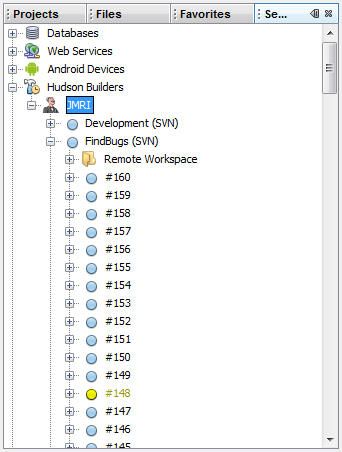
From now on, the current status of the Jenkins builds can be reviewed in the 'Services' window by expanding the 'JMRI' entry under 'Hudson Builders'.
Architecture Tests
ArchitectureTest
contains rules which seek to maintain and improve the overall system architecture of JMRI.
For example, the server classes should not depend on code within the system connection hardware types.
    noClasses()
        .that().resideInAPackage("jmri.jmris")
        .should().dependOnClassesThat().resideInAPackage("jmri.jmrix..");
ArchitectureCheck uses FreezingArchRule to collect issues in the archunit_store directory.
Should new issues be encountered, they'll be reported as errors.
Please fix them rather than committing a larger store.
The Test classes also undergo an Architecture Test, TestArchitectureTest.
Running
ant test-single -Dtest.includes=jmri.ArchitectureTestwill fail as no tests are executed. The build file specifies which JUnit Runners are Launched, i.e.
--include-engine=junit-jupiter --include-engine=junit-vintage
Within maven no launchers are specified ( hence all launchers are included ), though the Architecture tests are excluded from standard CI test executions.
These tests can be run with
mvn -Dtest=jmri.ArchitectureTest,jmri.TestArchitectureTest,jmri.util.FileLineEndingsCheck test
Cucumber Tests
Cucumber Tests allow
expected software behaviours to be specified in a logical language.
These are used to test the Web Server output ( in Firefox and Google Chrome ),
along with Application launches using simulation profiles for various hardware systems.
The Features and Step Definitions files are in the /java/acceptancetest folder.
The ant command runs all tests with the class name RunCucumberIT.class ,
so both the apps and jmri tests are performed.
ant cucumber