LogixNG Reference - Chapter 8
Local Variables
JMRI has memories that can store data. And that's great. But there is a problem with memories. They are global, which means that anyone can change them. Lets assume you want to count something so you create a memory IMCOUNTER. You create a LogixNG that does the counting and everything works fine.
A year passes and you need to count something else. You create a new LogixNG that does the new counting and you need a memory, so you decide to use the memory IMCOUNTER. And your new LogixNG works fine. But then you suddenly realize that something else on the layout stops working. Why? What has happen? Well, the problem is that you use the same memory IMCOUNTER for two different things in two different places. And when that happens, you get into trouble.
LogixNG has a simple solution to this problem, local variables. A local variable is similar to a memory, but it only exists in a very limited context and nothing outside that context can interfere with the variable. The local variable is also transient. It is only available during the execution of the ConditionalNG and it goes away when the execution is finished. This protects the local variable from being changed in an unpredictable way.
Defining local variables
Local variables are created in the ConditionalNG editor. Open the editor of a ConditionalNG and right-click on an action or expression and select Local variables.

The local variable dialog window will open.

To create a local variable, click on the Add variable button. A new row will be added. Double click in the Name field and give it a name. Select the Type and provide an initial value if desired. The Select menu is used to Delete a local variable and has Move Up and Move Down options if there is more than one variable.
Click on OK to finish. The local variable will be added to the tree. See the editor image below.
Local variable types

- None
- The initial value will be
null. - Boolean since 5.7.5
- Contains the boolean value true or false. The state is set or referenced by using the words true and false. The words are case insensitive. Setting an initial value is recommended.
- Integer
- A whole number such as 123
- Floating number
- A number such as 123.4
- String
- A series of characters, such as ABC123def
- Array
- A list of items. This is implemented using the Java ArrayList. This is similar to the Python List.
- Map
- A list of kev/value items. This is implemented using the Java HashMap. This is similar to the Python Dictionary.
- Local Variable
- Use the value from another local variable.
- Memory
- Use the value from a memory variable.
- Reference
- Use the value from an indirect reference.
- Formula
- Use the value from a formula
- Script expression
- Use a one line script command to set the value of the variable. For example:
sensors.getSensor("BlinkSensor"). This gets a sensor object which can then be set active or inactive. For details on accessing LogixNG objects from a script see Chapter 13 - Jython Scripting Support. - Script file
- For more complex logic, a script file can be used to set the value. There are sample
scripts at the jython/LogixNG directory within the JMRI install location.
Note: The results of the script are passed back to LogixNG using
variable.set(some_python_variable). This is a Python global variable that is added by the LogixNG scripting support. For details on accessing LogixNG objects from a script see Chapter 13 - Jython Scripting Support. - LogixNG Table
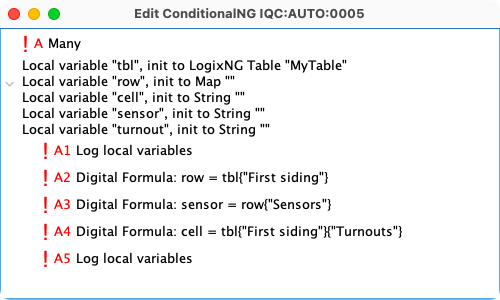
- Load the contents of a specified LogixNG table into a variable. The table name is
specified in the data column when creating the local variable. For global variables, use
the initial value field. Here is an example that creates the local variable and provides
access to the table rows and columns:
Note: The type of a variable can change based on the last assignment. For example, a
local variable with the name index defined as integer would change to string if
"XVZ" was assigned to index.
Arraysince 4.25.8
When an Array Local Variable is defined, it will default to empty. Rows can be added to the Array using the add method. The rows can also be defined by providing a value in the data column, in this example 5 rows for Array2.

Some examples of setting the initial Array values. size is another local variable that contains the row count, such as 23.
| Example | Result |
|---|---|
| Data field is empty | The array is empty |
| 12 | 12 empty strings in the array |
| size | 23 empty strings in the array |
| 12:"Hello world" | 12 "Hello world" strings in the array |
| size:"Hello world" | 23 "Hello world" strings in the array |
| 12:233 | 12 items with the number 233 in the array |
| size:233 | 23 items with the number 233 in the array |
| 12:43.323 | 12 items with the number 43.323 in the array |
| size:43.323 | 23 items with the number 43.323 in the array |
The rows in the array are accessed by using the row number. The first row has a row number
of zero. The last row number is the size of the array minus 1. To set the value of a row:
array[1] = value. To get the value: value = array[1].
The following list has the common ArrayList methods using the Java syntax.
- add(value) — Append a row to the array with the specified value.
- clear() — Remove all of the rows from the array.
- get(row) — Get the value of a row using a row number.
- set(row, value) — Set the value of a row using a row number and the new value.
- size() — Return the number of rows in the array
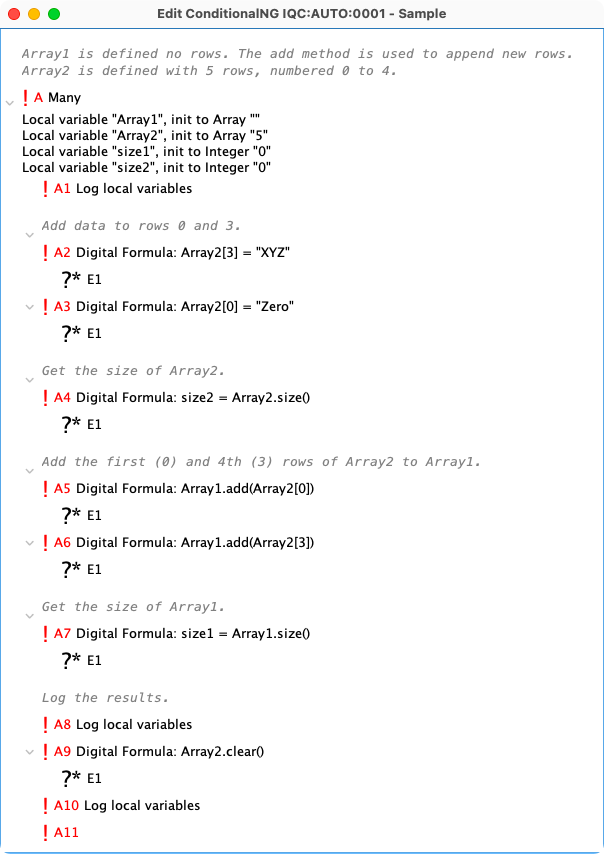
The following image shows some of the options for working with an array.
- A1
Log local variables: Name: size1, value: 0 Name: size2, value: 0 Name: Array1, value: [] Name: Array2, value: [, , , , ] Log local variables done - A2 and A3 changes two of the rows of Array2 to new values. The array was set with five rows. The rows are referenced using the row numbers.
- A5 and A6 copy the two rows from Array2 and adds them to Array1. The Array2 rows are referenced by row number, but the rows are appended to Array1. The corresponding row numbers in Array1 will be 0 and 1.
- A8
Log local variables: (A8) Name: size1, value: 2 Name: size2, value: 5 Name: Array1, value: [Zero, XYZ] Name: Array2, value: [Zero, , , XYZ, ] Log local variables done - A9 removes all of the rows from Array2.
- A10
Log local variables: (A8)
    Name: size1, value: 2
    Name: size2, value: 5
    Name: Array1, value: [Zero, XYZ]
    Name: Array2, value: []   <== Note zero length
Log local variables done
Mapsince 4.25.8
When a Map Local Variable is defined, it is empty. Rows are added as shown in the example.

The rows in the map are accessed by using the key for the row. To add a new key/value pair:
map{key} = value. The same syntax will replace the value for an existing key.
To get the value for a key: value = map{key}.
The following list has the common HashMap methods using the Java syntax.
- get("key") — Get the value for the key.
- put("key", "value") — Assign a value to the key. If a value already exists it is replaced with the new value.
- clear() — Remove all of the rows from the map.
- size() — Return the number of key/value pairs in the map
The following image shows some of the options for working with an array.

Log local variables:
  Name: Map1, value: {key=value}
  Name: Map2, value: {new=value, abc=xyz}
  Name: Size2, value: 2
  Name: Size1, value: 1
Log local variables done
Order of local variables
The order of the local variables that are defined in an action or expression matters if you use one variable in the initialization of another. Lets say you define two variables "a" and "b", and that you define "a" to be initialized to the formula "34 * 4" and you define "b" to be initialized to "a * 3". This will work if "a" is defined before "b". You can define both variables in the same action or expression, but "a" needs to be before "b" since "b" uses "a" in its initialization.
Local variables are local
This may seem obvious, but when writing scripts that uses local variables, it's important to remember this. A script can access the symbol table if it has access to the ConditionalNG, but the symbol table is dependent on which action or expression that's currently running.
The scope of a local variable depends on where it is defined in the tree. This a contrived example to show scope behavior.
There are two local variables defined. One at the root of the tree and a second one part way up the first branch.

The output on the JMRI system console shows the result when the ConditionalNG is executed.
in if trees
WARN  - Log local variables: [JMRI LogixNGThread]
WARN  - Name: rootlevel, value: null [JMRI LogixNGThread]
WARN  - Name: iftree, value: null [JMRI LogixNGThread]
WARN  - Log local variables done [JMRI LogixNGThread]

root level
WARN  - Log local variables: [JMRI LogixNGThread]
WARN  - Name: rootlevel, value: null [JMRI LogixNGThread]
WARN  - Log local variables done [JMRI LogixNGThread]
Initialization of local variables
When an action or expression is executed that defines local variables, these local variables are created with an initial value. When you create the local variable, you define what the initial value should be. 'None' means that the value will be 'null'. Reference means that the value will be the value that the reference is pointing at. Formula means the result of the formula.
Debugging local variables
What to do if the ConditionalNG doesn't do the expected? The debugger provides one tool, but another tool is the action Log local variables. Each time it's executed, it prints all the local variables and their values to the JMRI Sytem Console.

Options:
- Include global variables — The global variables will be listed after the local variables.
- Expand arrays and maps — The contents of each array and map will be listed.
- Show class name — The name of the Java class will be included for each item. Sometimes it is useful for debugging to know the actual type of the value.
Example:
WARN  - Log local variables: [JMRI LogixNGThread]
WARN  -     Name: time, Value: Time is 13:02 [JMRI LogixNGThread]
WARN  - Global variables: [JMRI LogixNGThread]
WARN  -     Global Name: gHour, value: 13 [JMRI LogixNGThread]
WARN  -     Global Name: gMin, value: 2 [JMRI LogixNGThread]
WARN  -     Global Name: timeMap, [JMRI LogixNGThread]
WARN  -         theHour -> 13, [JMRI LogixNGThread]
WARN  -         theMin -> 2, [JMRI LogixNGThread]
WARN  -         theTime -> The map time is 13:02, [JMRI LogixNGThread]
WARN  -     Global Name: timeArray, [JMRI LogixNGThread]
WARN  -         0: 13, [JMRI LogixNGThread]
WARN  -         1: 2, [JMRI LogixNGThread]
WARN  -         2: The array time is 13:02, [JMRI LogixNGThread]
WARN  -     Global Name: null, value: null [JMRI LogixNGThread]
WARN  - Log local variables done [JMRI LogixNGThread]